Catalis CMS Release: Alerts – Version 7.6.0
Now Available for New Responsive Sites (Launched After October 2023)
We’re excited to introduce Alerts, the first in a new collection of easy-to-use Elements designed to improve how you communicate important messages on your website. Whether it’s urgent notifications or routine updates, Alerts make it simple and effective to keep your visitors informed.
What’s New?
- Multi-Alert Carousel: Showcase multiple alerts at the top of any page, with smooth transitions between messages.
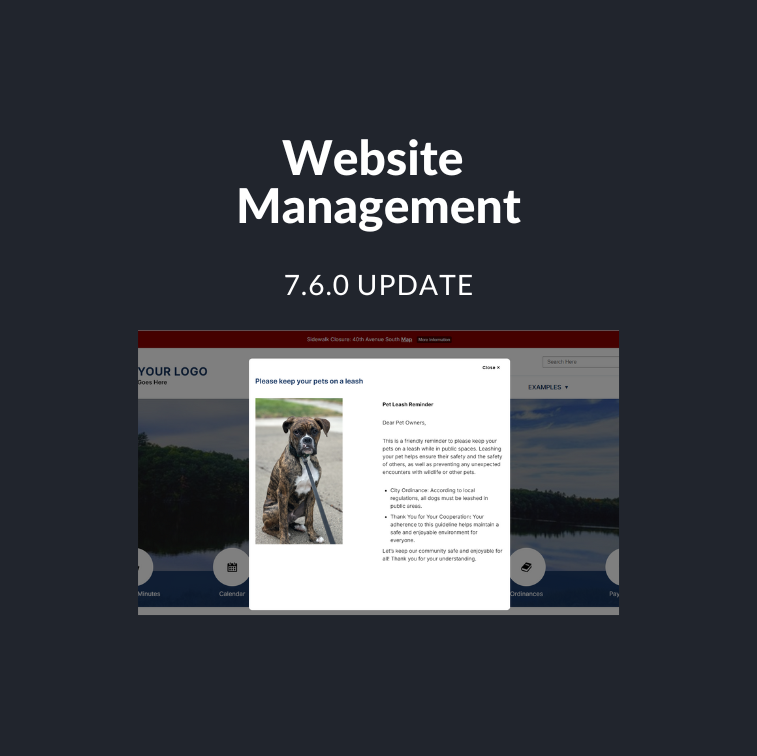
- Flexible Display Options: Display alerts as text at the top of the page, link them to other content, or include a pop-up dialog for more details—all on your terms.
- Color-Coded Priorities: Easily differentiate between alerts with color-coded options—Low (Green), Medium (Yellow), and High (Red).
- Streamlined Process: Set up alerts in just two steps—Create and View. No complicated setup required!
How to Use Alerts:
- Create Alerts – Adding an alert is as simple as creating a new page. You can manage, edit, or reorder alerts just like any other content type on your site.
- Automatic Promotion – Alerts are automatically promoted to the alert section of the page once added. You can place them on multiple pages with ease.
- Flexible Viewing Options – Choose to display alerts as a banner at the top of the page, or enhance visibility with a pop-up dialog for additional details—perfect for urgent or important messages.
Pop-Up Notifications Included!
We’re thrilled to let you know that pop-up notifications are part of this release! You can configure alerts to appear both as banners and pop-ups, offering your visitors a more dynamic experience.
Important Note for Existing Clients:
This feature is available for newer responsive design sites launched after October 2023. For older designs, a design update is required. If you have an older responsive design and would like to use the Alerts feature, contact our team at munisupport@catalisgov.com for a quote.
Helpful Tips:
To ensure your homepage remains clean and functional, follow our best practices when setting up alerts to avoid layout issues.